Understanding Shell Scripting for DevOps

I am an Associate Platform Engineer with 2.4 years of experience in IT, specializing in Linux administration, Cloud, and Big Data. With a strong focus on managing Linux servers and Cloudera Applications. My skill set includes a basic understanding of AWS Cloud services such as EC2, IAM, VPC, as well as DevOps tools like Ansible, Git, Jenkins, Docker, Kubernetes, and Containers.
Certifications: Red Hat Certified System Administrator | Red Hat Certified Engineer | Red Hat Certified Specialist in Ansible Automation (EX-407) | Certified Kubernetes Administrator (Certification ID: LF-pe1lwgmff0)
Introduction: In the world of DevOps, efficiency and automation are key. One powerful tool that aids in this process is shell scripting. Shell scripting allows users to automate tasks, execute commands, and manipulate files using a command-line interpreter. In this article, we will explore the fundamentals of shell scripting and its significance in the DevOps landscape.
🌟 Summary:
The kernel: The core program of an operating system with complete control over the system.
The shell: A user program providing an interface to the operating system, accepting human-readable commands and converting them for the kernel.
Linux Shell Scripting: Shell scripts are programs designed to be run by a command-line interpreter, performing operations such as file manipulation, program execution, and printing text.
1. Shell Scripting for DevOps: Automating Efficiency
Shell scripting plays a vital role in the world of DevOps by automating repetitive tasks and streamlining processes. DevOps teams can utilize shell scripting to orchestrate deployment pipelines, manage infrastructure, and monitor systems. With shell scripting, manual interventions can be minimized, saving time and effort.
For example, consider a DevOps engineer responsible for deploying a web application to multiple servers. By writing a shell script, they can automate the deployment process, ensuring consistency and efficiency across all servers. The script can handle tasks such as copying files, starting services, and configuring settings, all with a single command.
2. #!/bin/bash vs. #!/bin/sh
The "#!/bin/bash" at the beginning of a shell script is known as the shebang line. It specifies the interpreter to be used when executing the script. The "/bin/bash" refers to the Bash shell, a popular choice for shell scripting due to its extensive features and compatibility.
Alternatively, "#!/bin/sh" refers to the default system shell. On most Linux distributions, this points to the Bourne shell or a compatible shell like Dash. While Bash provides additional functionality, using "#!/bin/sh" ensures compatibility across different systems with minimal dependencies.
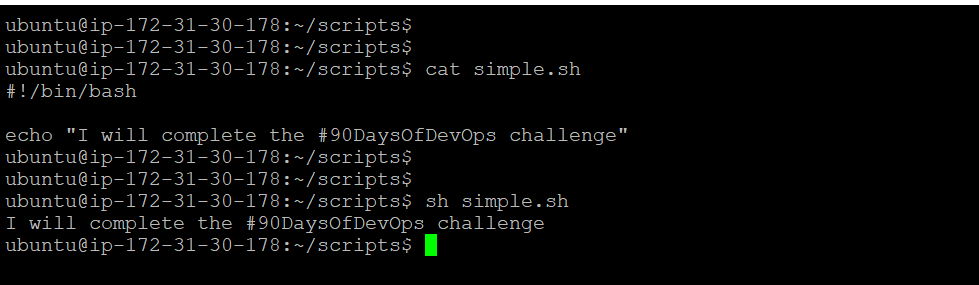
Shell Script Example: Completing the #90DaysOfDevOps Challenge
Let's write a simple shell script that prints the message "I will complete the #90DaysOfDevOps challenge" when executed:
Let's write a Shell Script to take user input, input from arguments and print the variables.
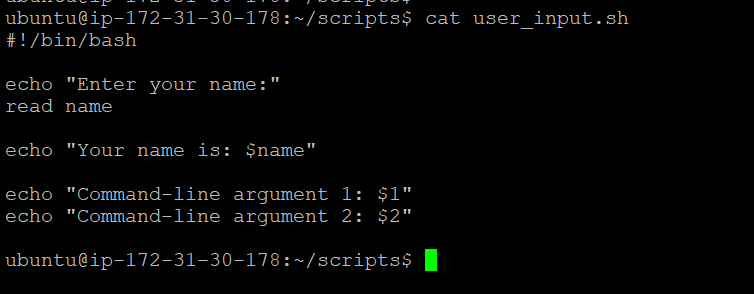
Let's see how the script works with some example inputs:
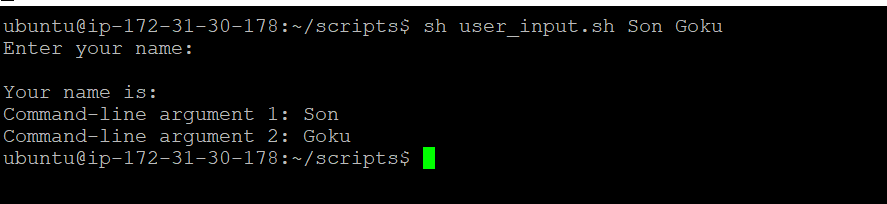
When executed without any command-line arguments, the script will prompt you to enter your name. After entering your name, it will display the provided name along with the message "Your name is: [user's name]".
To test command-line arguments, execute the script with additional values:
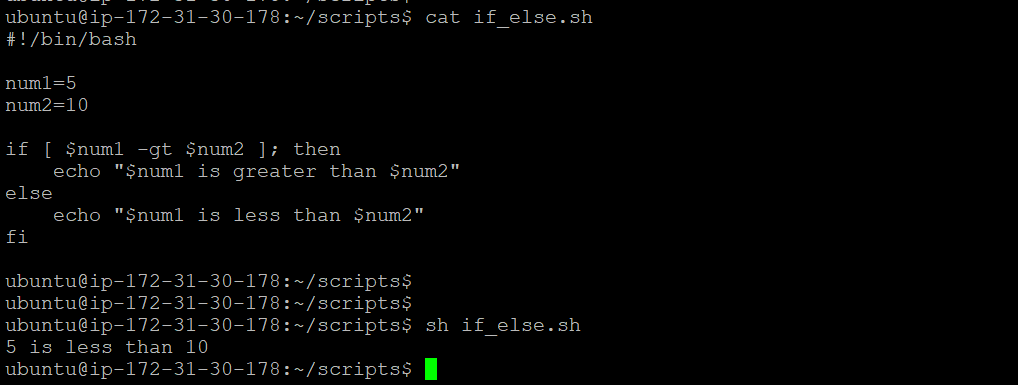
Write an Example of If else in Shell Scripting by comparing 2 numbers
Conclusion: Shell scripting is a powerful tool for DevOps practitioners, providing automation and efficiency in various tasks. Understanding the fundamentals and syntax of shell scripting allows DevOps teams to harness its capabilities effectively. By automating processes, managing infrastructure, and enhancing deployment pipelines, shell scripting becomes an invaluable asset in the world of DevOps.
🎉 🔥 Keep scripting and mastering DevOps with shell! 🔥 🎉


